Short answer
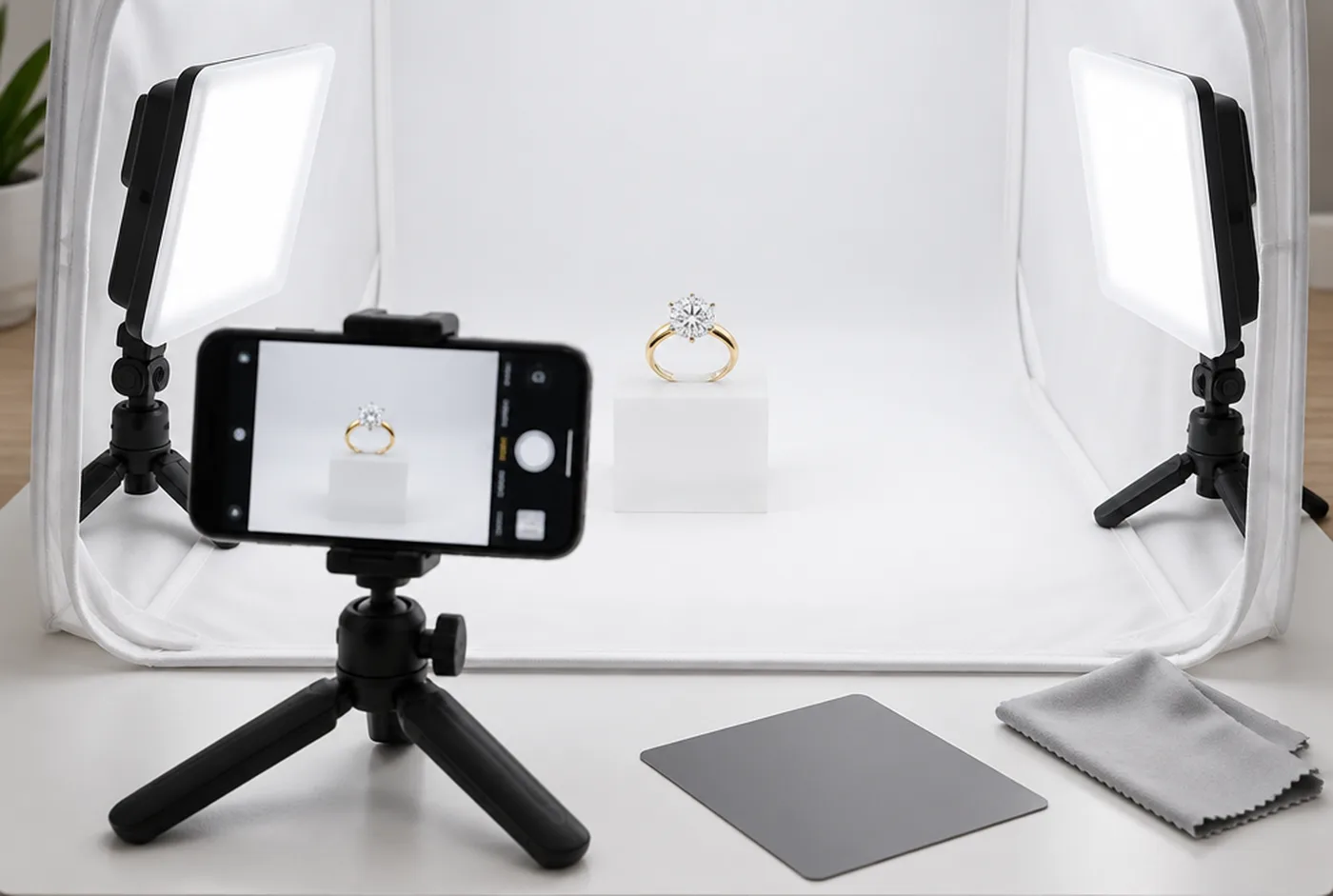
To photograph jewelry, put the piece in a light tent between 2 diffused LED panels, fix a phone on a tripod, lock focus and exposure, and never use digital zoom. Set white balance off a grey card, remove dust in editing, keep the stone untouched and export a 2048 x 2048 px square for Shopify.
- Gear
- Phone, tripod, light tent, 2 diffused LED panels, grey card
- Light
- Daylight-balanced LEDs, about 5000 to 5600K, both the same
- Shopify export
- 2048 x 2048 px square usually displays best (October 2026)
- Etsy export
- At least 2000 px wide and tall recommended (October 2026)
In this guide11 sections
You can learn how to photograph jewelry in one afternoon with 5 things: a phone, a tripod, a light tent, 2 diffused LED panels and a grey card. The method is the same for rings, earrings and pendants. Control the light, lock focus and exposure, shoot more frames than you need and edit lightly. This is the setup I'd hand a founder shooting their first 10 pieces.
I run my own fine-jewelry brands as well as Grandior. Most of the bad jewelry photos I see were not taken on a bad camera. They were taken in bad light, at the wrong distance, on a piece with a fingerprint on it.
What gear do you need to photograph jewelry?
Less than you think. Everything below fits on a desk.
| Item | How many | What it does |
|---|---|---|
| Phone or camera | 1 | A recent phone is enough for web packshots |
| Mini tripod with phone clamp | 1 | Keeps every frame identical, so you can blend them |
| Light tent or shooting box | 1 | Wraps the piece in even white light |
| Diffused LED panels | 2, same model | Soft, matching light from both sides |
| Grey or white card | 1 | Sets accurate white balance |
| Black and white foam cards | 2 or 3 | Shape reflections on polished metal |
| Clear acrylic block | 1 | Lifts the piece and adds a soft reflection |
| Museum putty or jeweler's wax | 1 small pack | Holds rings and studs upright, out of sight |
| Lint-free gloves, polishing cloth, air blower | 1 each | No prints, no dust |
Buy both LED panels at the same time, from the same model. Two panels with different color temperatures give you a piece that is warm on one side and cool on the other, and no edit fully fixes it. Daylight-balanced panels, around 5000 to 5600K, are the usual choice.
How do you set up a jewelry photo at home?
In 10 steps, and the same way every time, so the photos match across your catalog.
- Clear a table away from windows. Mixed daylight and LED light gives two color casts.
- Put up the light tent and lay a white or light grey sweep inside it.
- Place one LED panel on each side of the tent at the same height and power.
- Set the acrylic block in the center and the piece on top. Use a pea of putty behind a ring so it stands up.
- Clean the piece with gloves and a polishing cloth, then blow off dust.
- Mount the phone on the tripod at the angle you want: front, three-quarter or top-down.
- Shoot through the tent's front slit, so the phone's reflection doesn't land in the metal.
- Fill the frame by moving the tripod closer, not by zooming.
- Shoot a frame of the grey card in the same spot as the piece. You'll use it for white balance.
- Mark the tripod and block positions with tape so the next product sits in exactly the same place.
Read our parts of a ring guide before you choose angles. If you know the gallery and shank, you know which side views a buyer needs.
What camera settings work best for jewelry?
Manual control, low ISO and no digital zoom. Auto mode chases the bright white background and the piece comes out grey or blown out.
| Setting | Use | Why |
|---|---|---|
| Lens | Main 1x, or an optical 2x to 5x lens | Digital zoom throws away detail |
| Distance | As close as the lens can focus sharply | Fill the frame without zooming |
| ISO | Lowest available, often 50 to 100 | Less noise in metal and stones |
| Focus and exposure | Locked on the piece | Stops the phone refocusing between frames |
| Timer | 2 to 3 seconds | No shake from tapping the screen |
| Format | RAW if your phone offers it | More room to fix white balance |
On most phones you can press and hold on the piece to lock focus and exposure, then drag exposure up until the background is bright but the metal still has detail. Android phones usually have a Pro or Manual mode with ISO and shutter speed. Be careful with "macro" modes: on many phones they switch to the ultra-wide lens, which bends straight lines at the edges of the frame.
How do you handle reflections and sparkle on diamonds and polished gold?
Control what the metal sees, and give the stones a little hard light. Polished gold is a curved mirror. Whatever surrounds it, it shows.
Polished gold. The tent fills the metal with white, which is clean but can look flat. Hold a black card just out of frame on one side and the edge of the band picks up a dark line that shows its shape. Move the card until the line runs where you want it.
Diamonds. Fully diffused light makes diamonds look grey and lifeless. Sparkle comes from small, bright points of light hitting the facets. Add one small, harder light from above, or nudge a panel between frames, and pick the frame where the stone looks most like it does in your hand.
What is focus stacking, and do you need it?
Focus stacking blends several frames, each focused at a slightly different depth, into one image that is sharp from front to back. You need it for close-ups of rings, pavé and anything with depth.
Up close, only a thin slice of the piece is sharp. The front prong is crisp and the back of the band is soft. Keep the tripod still, take 5 to 15 frames while you move the focus point from front to back, then blend them. Photoshop's Auto-Blend Layers does it, as do dedicated tools like Helicon Focus and Zerene Stacker. Packshots shot from a little further back often don't need it at all.
How should you edit jewelry photos?
Lightly, and in the same order every time. Editing should make the photo match the piece, not improve it.
- White balance from your grey card frame. Copy the setting to every photo from the session.
- Exposure and contrast until the background is clean and the metal still shows texture.
- Dust and lint. Remove specks with a spot-healing tool. Leave real marks on the piece alone.
- Background. Clean it to an even white or light grey for packshots.
- Crop to your house aspect ratio, with the same margin around every piece.
Keep one unedited original of each product. As of October 2026, Etsy requires at least one unedited photo of the actual item against a real background for most listings (Etsy listing image requirements).
What file names and sizes should you use?
Name files by SKU, metal and view, and export copies sized for each channel. A name like RING-1042_14KY_front_01.jpg tells you, and your developer, exactly what is in the file.
As of October 2026, Shopify accepts images up to 5000 x 5000 px and under 20 MB, and says a 2048 x 2048 px square usually displays best (Shopify Help Center). Etsy recommends at least 2000 px in width and height, and at least 635 px for the first photo (Etsy Help). Shoot large, keep the master, and export smaller copies for email.
What are the most common jewelry photo mistakes?
Most come down to light, distance or dirt. Here are the usual ones.
| Mistake | Why it happens | Fix |
|---|---|---|
| Grey, dull background | Auto exposure reads the white as too bright | Lock exposure on the piece and raise it |
| Yellow or blue cast | Mixed daylight and LED, or mismatched panels | One light source type, white balance off a grey card |
| Phone visible in the metal | Shooting from inside the tent opening | Shoot through a small slit, or use a longer lens |
| Soft, blurry detail | Digital zoom or too close for the lens | Move the tripod, crop later |
| Back of the ring out of focus | Thin focus at close range | Focus stack 5 to 15 frames |
| Dead, grey diamonds | Only soft light on the stone | Add one small, harder light |
| Fingerprints and dust | No gloves, no blower | Clean before every shot, check at 100% zoom |
| Every product framed differently | Tripod moved between pieces | Tape marks for tripod and block |
When does learning how to photograph jewelry stop paying off?
When the shot list outgrows the afternoon. For 5 or 10 designs in one metal, DIY works. The math changes quickly after that.
Take 40 designs in yellow, white and rose gold. That's 120 packshot heroes before you've shot a single angle. Then every product needs a scale shot on a hand, ear or neck, which means booking hands or models. Lifestyle scenes and video need more. Most founders run out of time, not skill.
This is where our AI Studio takes over. Keep shooting clean packshots with the setup above, or send your existing product shots. We generate on-hand, on-model and lifestyle images around the real piece, retouch them, and check that the stones, prongs and metal match it. Starter 10 is $400 for 10 products and 40 images, or $40 per product. A 6 to 10 second product video is $20. For what AI does well and where it slips, read our guide to AI product photography. For the full shot list per product, see jewelry product photography, and for scale shots, our engagement ring on hand photo guide.
Making pieces with us? Order a sample to check quality and color before you shoot a metal you have not seen in person.
Next step
Shoot one clean packshot this afternoon with the setup above. Then send it to us: the $75 trial on the AI Studio page turns 1 product into 4 images and 1 short model video, so you can see your piece on a hand before you plan the rest.
Questions founders ask
Can you photograph jewelry with a phone?
Yes. A recent phone on a tripod, inside a light tent with two diffused LED panels, makes clean packshots for a product page. Use the main lens or an optical zoom lens, lock focus and exposure, and never pinch to zoom.
How do you photograph diamonds so they sparkle?
Keep the soft light for the metal and add one small, harder light, or move a light slightly between frames. Sparkle comes from small bright points hitting the facets. Never add sparkle in editing; it misrepresents the stone.
How do you stop reflections when photographing gold?
Surround the piece with white so the metal reflects white, not the room. Shoot through a slit in the light tent so the phone does not appear in the metal. Use a black card near the edges to add definition.
What background is best for jewelry photos?
White or light grey for the packshot hero. An acrylic block gives a soft reflection under the piece. Keep the same background for every product so the collection page looks consistent.
What is focus stacking in jewelry photography?
Focus stacking blends several frames, each focused at a different depth, into one image that is sharp from front to back. It is the fix for rings and pavé, where only a thin slice is sharp in a single close-up frame.
What size should jewelry photos be?
As of October 2026, Shopify says a 2048 x 2048 px square usually displays best, and Etsy recommends at least 2000 px in width and height. Shoot larger than you need and export copies for each channel.
Sources
Checked on October 31, 2026. Rules and rates change, so confirm with the source before you rely on a number.
Get new guides by email
Practical guides for jewelry brands, from what we see on real orders. Only new guides; unsubscribe any time.